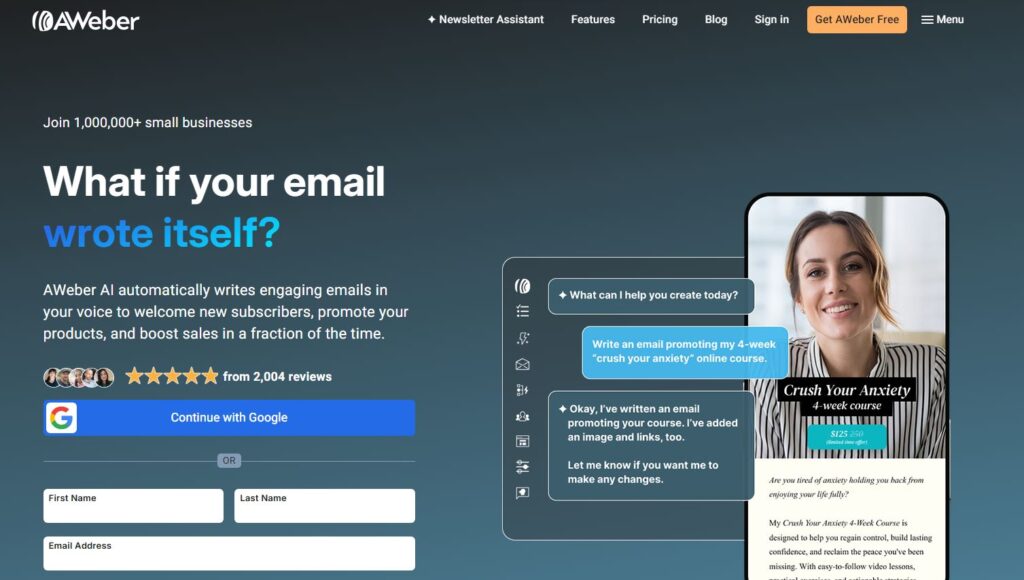
In the dynamic world of digital marketing, email marketing remains a powerful tool for businesses to connect with their audience, drive conversions, and build lasting relationships. AWeber, a Pennsylvania-based email marketing software founded in 1998, claims to have invented the autoresponder and has served over 1 million customers worldwide. With features like email automation, landing page builders, and AI-powered tools, AWeber is a popular choice for small businesses, bloggers, and eCommerce owners.
This AWeber review for 2025 dives deep into its features, pricing, performance, pros, cons, and real user experiences to help you decide if it’s the right email marketing platform for your marketing strategy. Whether you’re launching a newsletter, automating email campaigns, or optimizing for SEO, this guide explores why AWeber remains a top contender in 2025.
AWeber is a cloud-based email marketing software designed to simplify email campaign management for businesses of all sizes. With over 25 years of experience, AWeber offers tools for creating newsletters, autoresponders, landing pages, and web push notifications. Its user-friendly interface, drag-and-drop builder, and 1,000+ integrations make it a go-to solution for small business email marketing, bloggers, nonprofits, and eCommerce stores. AWeber’s Smart Designer uses AI to pull branding elements from your website, ensuring consistent email designs. The platform also boasts a 99.34% email deliverability rate, one of the highest in the industry, ensuring your emails reach subscribers’ inboxes.
In this AWeber review, we’ll explore its key features, pricing plans, integrations, and how it compares to competitors like Mailchimp, Constant Contact, and MailerLite.
Let’s dive into why AWeber is considered one of the best email marketing tools for 2025.
Key Features of AWeber
AWeber offers a robust suite of tools to streamline email marketing and enhance audience engagement.
Here are the standout features that make it a top email marketing software:
1. Email Automation and Autoresponders
AWeber pioneered the autoresponder, allowing businesses to send automated email sequences based on subscriber actions, such as sign-ups or purchases. Key automation features include:
Behavioral Triggers: Send targeted emails based on subscriber behavior, like website visits or link clicks.
Dynamic Segments: Create list segments based on custom fields, tags, or subscriber activity for personalized email campaigns.
Blog Broadcasts: Automatically send newsletters with new blog posts, podcast episodes, or YouTube videos via RSS feeds. This is ideal for bloggers looking to boost blog traffic.
Tip: Email automation saves time and increases customer retention by delivering timely, relevant messages.
2. Drag-and-Drop Email Builder
AWeber’s drag-and-drop email builder simplifies email creation with over 600 customizable templates covering industries like eCommerce, blogging, and nonprofits. The Smart Designer uses AI to pull logos, colors, and images from your website, creating branded templates in seconds. Users can also code custom HTML templates for advanced customization.
3. Landing Page Builder
AWeber’s landing page builder offers over 150 templates for lead generation, product sales, or event sign-ups. Features include:
Drag-and-drop functionality for easy customization.
Integration with WordPress, WooCommerce, and Google Analytics for tracking.
Ability to host pages on AWeber or link to your domain.
This is perfect for small businesses creating lead capture pages to grow their email lists.
4. Web Push Notifications
AWeber’s web push notifications allow you to re-engage visitors even when they’re not on your site, driving blog traffic and conversions. These notifications are managed from the same dashboard as email campaigns, streamlining workflows.
5. AI-Powered Tools
AWeber’s AI tools enhance content creation and campaign performance:
Newsletter Assistant: Crafts newsletters in your brand’s voice using AI, reducing manual effort.
AI Content Generator: Creates subject lines, email copy, or landing page content based on prompts.
Smart Designer: Auto-generates branded email templates from your website.
These tools are ideal for content creators and small businesses looking to save time on email marketing.
6. Integrations
AWeber integrates with over 1,000 platforms, including WordPress, WooCommerce, Shopify, Etsy, PayPal, Facebook, and Zapier. This allows seamless eCommerce integration and CRM connectivity for streamlined marketing workflows.
7. Sign-Up Forms
AWeber’s sign-up forms (pop-ups, in-line, or lightbox) are customizable and integrate with WordPress or Wix. The AWeber WordPress plugin automatically adds commenters or registrants to your email list, boosting lead generation.
8. Analytics and Reporting
AWeber’s analytics dashboard tracks open rates, click-through rates, bounces, and sales. A/B testing allows you to test subject lines, content, or send times to optimize campaign performance. Real-time results help identify winning variants quickly.
9. Customer Support
AWeber offers 24/7 customer support via live chat, email, and phone (Monday-Friday, 8 a.m.-8 p.m. EST; weekends, 9 a.m.-5 p.m. EST). Extensive resources, including blog posts, videos, podcasts, and a 24/7 Email Marketing Master Class, support beginners and experts alike.
AWeber Pricing Plans
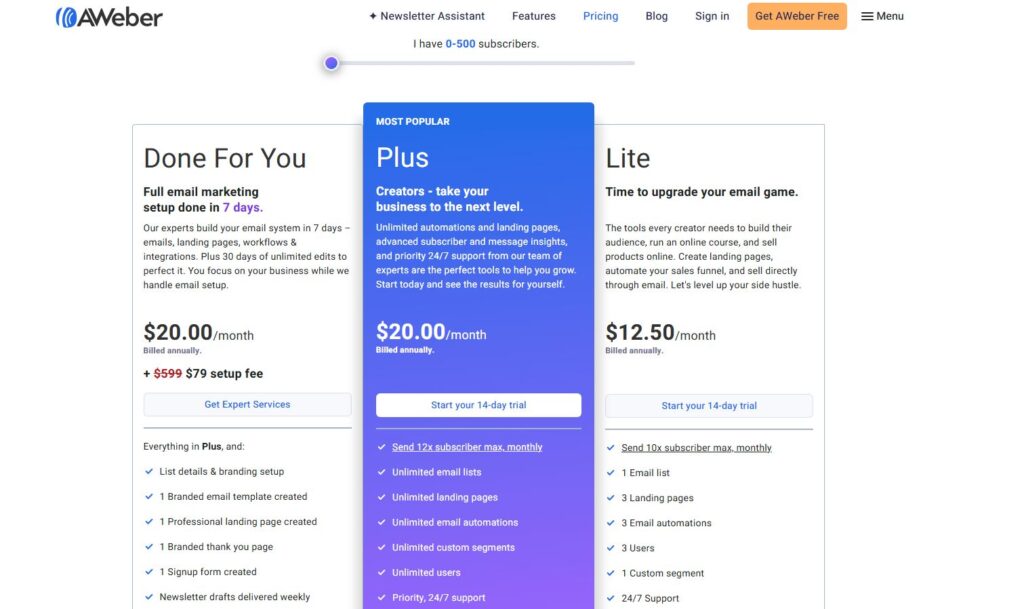
AWeber’s pricing is based on subscriber count and features, with a freemium model and flexible plans. Here’s a breakdown of the 2025 plans:
Free Plan: Up to 500 subscribers, 3,000 emails/month, 1 email list, basic automation, landing pages, and web push notifications. Ideal for beginners or small businesses.
Lite Plan: $15/month (500 subscribers) – Adds 1 custom segment, 3 landing pages, 3 automations, and basic analytics.
Plus Plan: $30/month (500 subscribers) – Includes sales tracking, advanced landing pages, and unlimited automations.
Unlimited Plan: $899/month – Unlimited subscribers and features, suited for large enterprises.
Pro Plan: $16.15/month (annual billing, 500 subscribers) – Offers unlimited emails and advanced features.
Note: Both subscribed and unsubscribed contacts count as billable, which may increase costs as lists grow. Annual billing saves up to 19.2%. A 30-day free trial is available, though billing details are required upfront.
Tip: For affordable email marketing, the Free Plan is great for small business email marketing, while the Pro Plan suits growing businesses.
Based on user reviews and expert insights, here are AWeber’s key advantages:
High Deliverability: A 99.34% deliverability rate ensures emails reach inboxes, not spam folders.
Ease of Use: The drag-and-drop builder and intuitive hPanel make email creation beginner-friendly.
Robust Automation: Autoresponders and behavioral triggers streamline email campaigns and boost customer engagement.
Extensive Integrations: Over 1,000 integrations with eCommerce and CRM platforms enhance marketing workflows.
AI Tools: The Newsletter Assistant and Smart Designer save time on content creation.
Excellent Support: 24/7 customer support via live chat, phone, and email is highly rated, with extensive educational resources.
Free Plan: Offers robust features for beginners with up to 500 subscribers.
Cons of AWeber
Despite its strengths, AWeber has limitations:
Pricing Concerns: Costs rise quickly with subscriber growth, and billable unsubscribed contacts increase expenses.
Limited Free Plan: Only 1 email list and no advanced analytics or split testing in the Free Plan.
Outdated Templates: Some email templates feel dated, requiring customization.
Landing Page Issues: Landing pages may not integrate seamlessly with WordPress and lack advanced editing options like photo cropping.
Customer Service Complaints: Some users report account suspensions without clear explanations or delayed responses, especially for compliance issues.
Deliverability Inconsistencies: Recent tests show a 21.2% improvement, but historical deliverability issues persist.
Lack of Advanced Features: Missing spam testing, advanced automation rules, or dynamic content compared to Mailchimp or Klaviyo.
Real User and Expert AWeber Reviews
To provide a balanced perspective, we’ve compiled feedback from users and experts based on AWeber reviews from sources like Capterra, TrustPilot, and WPBeginner.
Positive Reviews
Ease of Use: “AWeber’s interface is straightforward, and I had my first email campaign running in minutes. The WordPress plugin makes lead capture seamless.” – Blogger on Capterra.
Customer Support: “The 24/7 live chat resolved my issue in under 5 minutes. Their support team is top-notch.” – Small business owner on TrustPilot.
Automation: “AWeber’s autoresponders helped me nurture leads automatically, saving hours each week.” – eCommerce owner on Capterra.
Deliverability: “The 99.34% deliverability rate ensures my newsletters reach my audience reliably.” – Marketer on emailtooltester.com.
Negative Reviews
Account Suspensions: “AWeber suspended my account within 24 hours, claiming ‘unsolicited emails’ despite my opt-in list. No refund was offered.” – User on TrustPilot.
Pricing: “The cost for 12,000 subscribers jumped to $149/month, which is steep compared to MailerLite’s $75/month.” – Blogger on marketinglogiq.com.
Interface Issues: “The 2025 interface changes made campaign management less intuitive.” – User on TrustPilot.
Landing Pages: “Integrating landing pages with WordPress was clunky, and photo editing options are limited.” – Developer on Capterra.
Expert Opinions
WPBeginner: “AWeber’s Free Plan and WordPress integration make it ideal for beginner bloggers, but advanced users may need more robust analytics.”
EmailToolTester: “AWeber’s Smart Designer and autoresponders are impressive, but pricing and lack of advanced automation lag behind competitors.”
StyleFactoryProductions: “AWeber’s blog broadcasts and customer support are excellent, but dated templates and high costs for larger lists are drawbacks.”
Capterra: “With a 4.4/5 rating from 320 reviews, AWeber is praised for ease of use and deliverability but criticized for pricing as lists grow.”
How does AWeber compare to Mailchimp, Constant Contact, MailerLite, and Klaviyo? Here’s a quick comparison:
AWeber vs. Mailchimp: Mailchimp offers advanced automation and analytics but is pricier for larger lists. AWeber’s Free Plan is more generous, and its deliverability is superior.
AWeber vs. Constant Contact: Constant Contact has a more modern interface but fewer integrations. AWeber’s autoresponders and blog broadcasts are more robust.
AWeber vs. MailerLite: MailerLite is cheaper ($75/month for 15,000 subscribers) and offers advanced automation, but AWeber’s customer support and integrations are stronger.
AWeber vs. Klaviyo: Klaviyo excels in eCommerce analytics but is complex and expensive. AWeber is more beginner-friendly and affordable.
Tip: If you’re searching for AWeber alternatives, consider MailerLite for affordable email marketing or Klaviyo for eCommerce-focused campaigns.
Leverage Blog Broadcasts: Use RSS feeds to send automated newsletters with new blog posts for consistent audience engagement.
Optimize with A/B Testing: Test subject lines and content to improve open rates and click-through rates.
Use Smart Designer: Create branded email templates quickly with AI to maintain brand consistency.
Segment Lists: Use dynamic segments to send personalized email campaigns based on subscriber behavior.
Integrate with eCommerce: Connect with Shopify or Etsy to automate product promotion emails.
Monitor Analytics: Track campaign performance to refine email strategies and boost conversions.
Conclusion: Is AWeber Worth It in 2025?
After analyzing AWeber reviews, user feedback, and expert insights, it’s clear that AWeber is a reliable email marketing software for 2025. Its autoresponders, drag-and-drop builder, AI tools, and 1,000+ integrations make it a strong choice for small businesses, bloggers, and eCommerce owners. The 99.34% deliverability rate and 24/7 customer support ensure consistent email campaign performance, while the Free Plan is perfect for beginners. However, high pricing for larger lists, occasional interface issues, and limited advanced features may deter large enterprises or users needing sophisticated automation.
For those seeking an affordable email marketing solution with robust automation and integrations, AWeber’s 30-day free trial is a great way to test its capabilities. Visit AWeber.com to explore plans and start building your email campaigns today. For AWeber discounts, check their official site or trusted reviews on WPBeginner and Capterra.
Tip: For email marketing for small businesses, AWeber’s Free Plan and autoresponders are unbeatable, while the Pro Plan supports growing email lists.